The Panasonic SD-YD250 bread maker can prepare white bread, whole wheat bread, multigrain loaves, French bread, flavored bread, and dough for pizza and rolls. For the best results, follow a recipe made for this model, measure each ingredient with care, and use the correct baking program.
Homemade bread is a simple way to bring fresh food to an American kitchen. A warm loaf can go with eggs at breakfast, soup at lunch, or a sandwich packed for work or school. The Panasonic SD-YD250 bread maker can handle much of the mixing, kneading, rising, and baking for you.
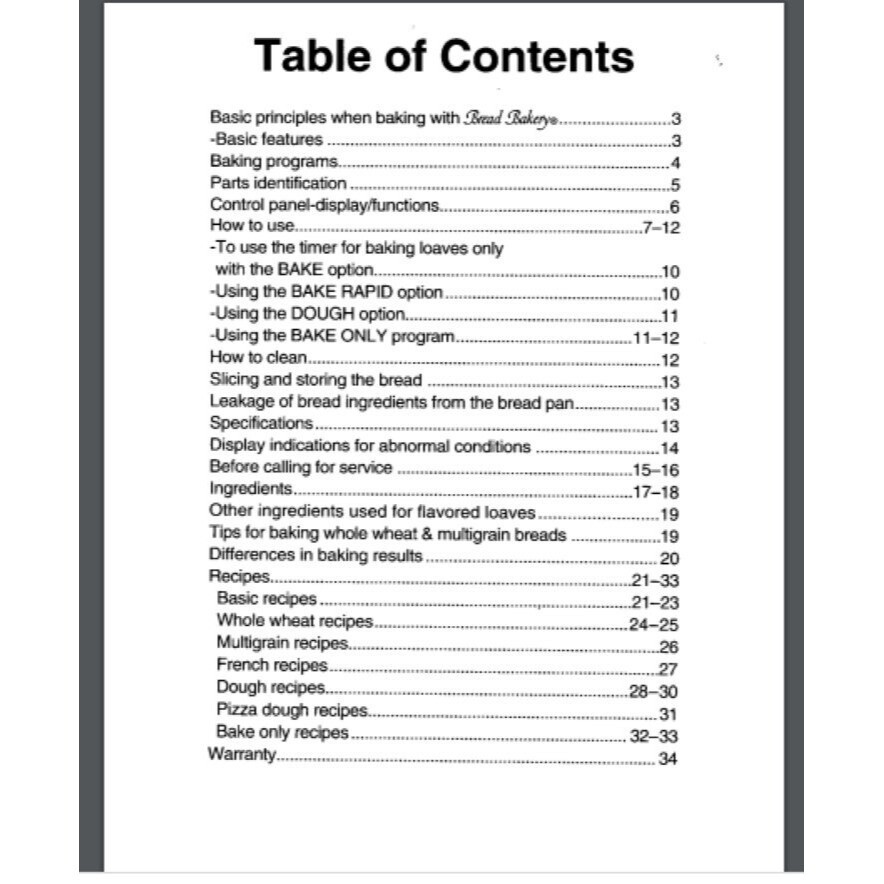
Finding the right SD YD250 recipes can take a little work, especially if you have an older machine without its paper recipe book. The good news is that the original operating instructions include recipes for several kinds of bread and dough. Panasonic also lists model-specific support information for owners who need help with cleaning, settings, or baking problems.
This guide explains how to use the machine, which recipes to try, and what to check when a loaf turns out too dense, too dry, or poorly risen. The recipes below distinguish between guidance drawn from the original recipe book and simple serving ideas. Use the original manual for exact ingredient amounts when you prepare a listed model-specific recipe, rather than treating a general bread recipe as an exact replacement.
The SD-YD250 is an automatic bread maker with several bread and dough programs. Its original recipe book covers more than one type of loaf, so you do not need to stick to plain white bread every time. The right choice depends on the flour, extra ingredients, and the texture you want.
Panasonic’s model information lists basic, whole wheat, multigrain, French, pizza, and cake options, along with dough and bake functions. The exact recipe and program should match the type of food you are making. A bread cycle and a dough cycle do different jobs, so choosing the wrong one can leave you with an unfinished result.
The model has medium, large, and extra-large loaf settings. It also offers light, medium, and dark crust choices. Not every recipe is meant for every size, so check the size column in the original manual before measuring your ingredients.
Source: in.pinterest.com
Basic white bread
A mild loaf for toast, sandwiches, and everyday meals.
Whole wheat bread
A bread made with whole wheat flour, often with a firmer texture than white bread.
Multigrain bread
A loaf that combines grains or seeds according to the recipe.
French bread
A less rich style of bread that uses its own recipe and baking program.
Pizza and roll dough
Dough that the machine mixes and kneads before you shape and bake it.
Check Your Exact Model Before Starting
Look for SD-YD250 on the model label before using a recipe from another Panasonic bread maker. Similar model names do not guarantee the same program options, pan size, or ingredient amounts. If you have a different model, use its own operating instructions.
Panasonic’s North American support site lists the SD-YD250 as a discontinued model and provides links to its operating instructions and recipes. A paper manual may also be available through a used appliance seller, but check that it matches the full model number.
Find the recipe section
The SD-YD250 manual contains separate sections for basic, whole wheat, multigrain, French, dough, pizza dough, and bake-only recipes.
Match the loaf size
Use the medium, large, or extra-large column shown for the recipe instead of guessing the amount.
How to Use SD YD250 Recipes Correctly
Accurate measuring is the first step toward a good loaf. Bread dough depends on the balance of flour, liquid, yeast, salt, and other ingredients. Too much water can make the dough weak, while too much flour can leave the loaf dry and heavy.
The original SD-YD250 instructions advise using weight measurements when possible because flour volumes can vary. A cup of flour may hold different amounts depending on how it was scooped and packed. If the manual gives both a weight and a cup estimate, use the weight for more consistent results.
Before adding ingredients, make sure the kneading blade is fitted onto the shaft inside the bread pan. Check that the blade and shaft are free of old dough. A blade that is missing or unable to turn can stop the ingredients from mixing properly.
Source: ca.pinterest.com
1. Remove the bread pan
Lift it out as described in the manual, then fit the kneading blade onto the mounting shaft.
2. Measure the ingredients
Use the amounts listed for the recipe and selected loaf size. Level dry measures and avoid estimating yeast or salt.
3. Add the main ingredients
Follow the SD-YD250 loading order. The instructions direct users to put dry ingredients in the pan first, apart from the yeast, and then add the liquids.
4. Load the yeast dispenser
Put the specified dry yeast into the automatic dispenser and close its lid. The dispenser must be dry enough for the yeast to drop correctly.
5. Return the pan to the machine
Make sure the pan sits correctly in the unit and lower its handle before closing the main lid.
6. Select the program
Choose the correct menu, loaf size, and crust setting before pressing Start.
7. Remove and cool the bread
When the cycle ends, use oven mitts to remove the hot pan. Turn out the loaf and allow steam to escape before slicing.
Why Ingredient Order Matters
The automatic yeast dispenser is a key part of the SD-YD250 design. It releases the yeast during the cycle instead of leaving it in direct contact with the liquid from the start. This is useful when you use a delayed start, because premature contact between yeast and liquid can affect the timing of fermentation.
Do not pour liquid into the yeast dispenser. Keep the dispenser free of moisture, and do not place the yeast in the bread pan unless the instructions for your selected recipe or program call for it. Follow the model manual rather than a loading order copied from a different machine.
Dry dispenser
Check that no water remains in the yeast compartment before adding yeast.
Clean pan
Remove old crumbs and dough from the pan and kneading blade before loading a new batch.
Basic White Bread for the SD-YD250
Basic white bread is a sensible first recipe because it uses familiar ingredients and works well for toast or sandwiches. The original SD-YD250 recipe book includes a Basic White Bread formula with separate measurements for extra-large, large, and medium loaves.
The listed ingredients are bread flour, salt, dry milk, butter, sugar, water, and dry yeast. Use the precise quantities in the model’s recipe table for your chosen loaf size. Do not use the ingredient list alone as a complete recipe, because the amounts are what make the formula work.
Choose the Basic program, then select the size and crust setting specified by your recipe. The manual also describes a Rapid option, but it has its own instructions. For Rapid baking, the SD-YD250 manual says to add an extra teaspoon of dry yeast to the specified recipe. Follow the complete recipe directions for that cycle rather than assuming all bread programs take the same time.
Source: www.pinterest.com
Ingredients to prepare
Bread flour, salt, dry milk, butter, sugar, water, and dry yeast, measured in the amounts listed for the selected loaf size.
Program
Use the Basic program for the standard white bread recipe.
Crust
Choose light, medium, or dark according to your preference and the manual’s directions.
Expected use
Serve the loaf as toast, use it for sandwiches, or pair it with soup.
How to Tell When White Bread Is Ready
A finished loaf should be baked through and should hold its shape when removed from the pan. Let it cool on a rack or another clean surface with room for air to move around it. Cutting too soon releases steam and can make the center seem sticky.
If the loaf has a sunken top, a very dense center, or a damp base, do not assume the machine is broken. Check the ingredient measures and the selected program first. Excess water, too much yeast, the wrong flour, or a loaf left in the pan too long can affect the result.
For sandwiches
Let the loaf cool before cutting even slices.
For toast
Cool the bread fully, then slice and toast it as needed.
Whole Wheat Bread Recipes
Whole wheat bread offers a more earthy flavor and a denser bite than a basic white loaf. Whole wheat flour contains the bran and germ as well as the inner part of the grain, so it behaves differently from refined bread flour. That difference affects how the dough absorbs water and how the loaf rises.
The SD-YD250 recipe book has a dedicated Whole Wheat program and model-specific whole wheat recipes. Use the flour blend and liquid amount listed for the exact loaf size. Avoid replacing all the bread flour in a white bread recipe with whole wheat flour unless you are using a tested formula for that change.
Whole wheat dough can look different from white bread dough during kneading. The aim is to follow the specified formula and allow the machine to complete the correct cycle. If the loaf turns out heavy, check your flour measurement, yeast freshness, and program choice before changing the liquid.
Source: ebay.com
Use the Whole Wheat program
Select the cycle intended for the whole wheat recipe rather than using Basic by default.
Measure carefully
Whole wheat flour can absorb a different amount of water than white bread flour, so use the recipe’s own quantities.
Keep the first attempt simple
Try the plain recipe before adding nuts, seeds, dried fruit, or other extras.
Making Whole Wheat Bread Less Dense
A dense loaf can result from several causes, including old yeast, too much flour, too little water, or the wrong program. Check these items one at a time. If the dough did not mix well, also inspect the kneading blade and confirm that the pan was seated correctly.
Do not add a large amount of water just because whole wheat dough looks firmer than white bread dough. Start with the manual’s measurements, then use the machine’s results to guide any later adjustment. Make small, recorded changes only after you have a reliable baseline recipe.
Check yeast
Use fresh dry yeast of the type specified in the manual.
Check flour
Measure the amount carefully and use the flour type named in the recipe.
Multigrain and Flavored Bread Ideas
The SD-YD250 manual includes multigrain recipes and several flavored loaves. These give you a way to change the taste without building a new bread formula from scratch. The manual’s recipes include options such as cranberry bread, carrot spice bread, and egg bread, with ingredients chosen for each formula.
For a first flavored loaf, follow the original recipe exactly. Fruit, vegetables, eggs, juice, and other additions can change the moisture level or texture. Do not add a large handful of extra ingredients simply because the dough looks plain at the start of the cycle.
Some SD-YD250 programs have a raisin setting or an ingredient-add signal. The manual explains that dried fruit can be added when the machine beeps during the appropriate raisin cycle. This helps limit crushing during kneading. Follow the directions for the chosen program, because not every cycle uses the same process.
Source: www.pinterest.com
Cranberry bread
The model recipe book lists a cranberry loaf with a measured amount of cranberry juice and other ingredients. Use the exact recipe amounts instead of substituting an equal volume of whole berries.
Carrot spice bread
The original recipe includes grated carrot, allspice, and honey. Measure the carrot and liquid as directed, since fresh vegetables can change the moisture balance.
Egg bread
The recipe uses egg and a measured amount of milk. Follow the recipe’s liquid instructions and use the correct cycle.
Multigrain bread
Use the grain blend and amounts listed in the multigrain section. Extra seeds or grains can make a loaf heavier if you add too much.
When Should You Add Fruit or Seeds?
Check the recipe and the selected menu before adding fruit or seeds. If the manual calls for a beep, wait for it and then add the specified amount. This helps preserve the texture of the added pieces and lets the machine mix them at the intended stage.
For ingredients that are not listed in the recipe, avoid making several changes in one batch. An extra ingredient can affect dough moisture, rise, or mixing. Test one modest change only after the original recipe works well.
Follow the signal
Add ingredients at the time specified by the recipe and program.
Avoid excess additions
Stay within the recipe’s amounts so the dough can mix and rise as intended.
Pizza Dough and Roll Dough in the SD-YD250
The SD-YD250 can mix and knead dough for food that you finish in your oven. The Dough program prepares dough through mixing and its first rise, while the Pizza program is intended for pizza dough. This lets you make the dough in the machine and shape it by hand afterward.
Use the recipe listed under the correct dough heading in the original manual. The amounts for pizza dough are not automatically interchangeable with the basic bread formula. Dough recipes can have different proportions of flour, water, fat, salt, and yeast, so do not assume a loaf recipe will produce the right pizza texture.
When the cycle ends, remove the dough and place it on a lightly floured work surface if needed. Shape it according to your recipe. Allow it to rise further only when the recipe calls for that step, then bake it in a properly preheated oven using the temperature and time given in your chosen dough recipe.
Source: artist.misef.org
For pizza night
Use the Pizza program and its matching recipe, then shape the dough and add your chosen toppings.
For dinner rolls
Use a suitable dough recipe, divide the dough into even pieces, shape them, and allow the required final rise before baking.
For breadsticks
Use a compatible plain dough recipe, shape the pieces evenly, and bake them according to a suitable recipe.
How to Shape and Finish Pizza Dough
After the machine finishes, transfer the dough to a clean work surface. If it sticks, dust the surface lightly with flour rather than adding a large amount to the dough. Too much extra flour can make the crust dry or tough.
Shape the dough to suit your pan or baking surface. Add sauce, cheese, and toppings in amounts that will not leave the center too wet. Follow the oven temperature and baking time in the recipe you are using, since crust thickness and toppings affect how quickly pizza cooks.
Use light flour dusting
Add only enough flour to make handling easier.
Check the center
Make sure the crust and toppings are cooked before serving.
How to Fix Common SD-YD250 Baking Problems
Most poor bread results have a few likely causes: incorrect measurements, unsuitable ingredients, an incorrect program, or a problem with mixing. Check the simplest causes first. Change one thing at a time so you can tell which change helped.
The SD-YD250 manual has a troubleshooting section for problems such as bread that rises too much, bread that fails to rise, a sticky center, and a loaf that does not bake as expected. Panasonic’s support pages also provide model-specific help. Use those instructions before assuming the appliance needs repair.
Source: storage.googleapis.com
Bread rises too much and then sinks
Check whether the recipe contains too much water or yeast, too little flour, or ingredients that were not listed. Measure flour carefully and use the correct loaf size.
Bread does not rise enough
Check yeast freshness, the yeast type, the flour type, the measured water, and whether the yeast was placed in the correct dispenser.
Bread is wet or sticky inside
Confirm the correct program was selected, allow the loaf to cool, and check whether ingredient amounts match the recipe.
The blade does not knead the dough
Check that the kneading blade is fitted correctly and that the pan is seated properly. If the shaft cannot turn when the machine is unplugged and cooled, seek qualified service advice.
The machine smells burnt
Stop the machine if there is smoke, an unusual burning smell, or another sign of an electrical fault. Unplug it when safe and check the manual’s safety guidance before using it again.
A Simple Troubleshooting Order
Start by checking the selected menu and loaf size. Then compare each ingredient against the recipe, including water and yeast. Next, check the age and storage of the flour and yeast, followed by the condition of the kneading blade and bread pan.
If the same fault continues with a correct recipe and fresh ingredients, stop making repeated batches and consult Panasonic’s model-specific support information. Do not open the appliance housing or attempt electrical repairs unless you are qualified to do that work.
First
Verify the program, loaf size, and crust setting.
Second
Recheck all measurements and the ingredient order.
Third
Use fresh ingredients and inspect the pan and blade.
Last
Contact an appropriate service provider if a mechanical or electrical problem remains.
Cleaning and Storing Your Bread Maker
Clean the SD-YD250 after each use so old dough and crumbs do not affect the next loaf. Unplug the machine and allow it to cool before cleaning. The pan and kneading blade should be washed by hand with mild liquid detergent, according to Panasonic’s care guidance.
Do not submerge the bread pan in water, and do not put the pan or kneading blade in the dishwasher. If the blade is stuck, allow the pan to soak with lukewarm water for five to ten minutes after it has cooled, then try to remove the blade by turning the mounting shaft. Avoid abrasive pads that can scratch the nonstick coating.
Wipe the outside and lid with a damp cloth. The yeast dispenser should be cleaned with a dry cloth, or allowed to dry fully if a damp cloth is used. The temperature sensor needs gentle care. Keep the appliance away from water and never clean it while it is connected to power.
Source: ebay.com
Wash removable parts by hand
Use mild detergent and avoid abrasive cleaners or steel wool.
Keep the yeast dispenser dry
Moisture can stop the yeast from dropping properly during a cycle.
Store ingredients well
Keep flour in a cool, dry place and store yeast according to its package directions. Close opened packages tightly.
How to Keep Bread Fresh
Let bread cool before storing it. Trapping steam in a sealed bag while the loaf is still hot can make the crust soft and the inside damp. Once cool, keep the loaf in a clean bread bag or suitable container, and use it within a reasonable period based on your kitchen conditions.
For longer storage, slice the cooled loaf and freeze portions in a freezer-safe bag or container. Take out only the slices you need. You can thaw them or toast them straight from frozen, depending on the texture you want.
For daily use
Store cooled bread in a clean, covered container.
For later meals
Freeze portions in a well-sealed, freezer-safe package.
Frequently Asked Questions
Q
Where can I find the original SD-YD250 recipes?
The original Panasonic SD-YD250 operating instructions include a recipe section with basic, whole wheat, multigrain, French, dough, pizza dough, and bake-only recipes. Panasonic’s North American support page lists the model and links to its operating instructions and recipes. Check that the manual says SD-YD250 before using its measurements.
Q
Can I use regular bread machine recipes in the SD-YD250?
Some general bread machine recipes may work, but the result depends on the recipe size, ingredient amounts, program, and pan capacity. Start with a recipe designed for the SD-YD250 when possible. Do not assume that a recipe for another model uses the same loaf size or ingredient order.
Q
What flour works best for SD-YD250 bread?
Use the flour named in the recipe. Bread flour is used in the basic white bread formula, while the whole wheat and multigrain recipes call for their own flour blends. Changing the flour can change how the dough absorbs water and rises, so make substitutions only with a suitable recipe.
Q
Why is my SD-YD250 bread dense?
Common causes include old yeast, too much flour, too little liquid, the wrong flour type, or the wrong program. Check the recipe and ingredient measures first. Also make sure the kneading blade is installed and the pan is seated correctly. If the same problem continues, consult the troubleshooting section of the manual.
Q
Can the SD-YD250 make pizza dough?
Yes. The SD-YD250 has a Pizza program and a matching dough recipe section. Use the exact pizza dough formula from the manual, then remove and shape the dough after the cycle. Finish it in an oven according to the recipe you are following.
Q
Can I add raisins or dried fruit to the dough?
Use a recipe and program that support the addition of fruit. The SD-YD250 instructions describe adding dried fruit when the machine beeps during the appropriate raisin cycle. Follow the amount and timing in the manual so the fruit is not crushed or added at the wrong stage.
Q
Why does the yeast dispenser need to stay dry?
The SD-YD250 uses an automatic yeast dispenser to release yeast during the baking cycle. Panasonic’s instructions warn that moisture can prevent the yeast from dropping fully. Clean the dispenser as directed and let it dry completely before adding fresh yeast.
Q
How should I clean the SD-YD250 bread pan?
Unplug the machine and allow it to cool. Wash the pan and kneading blade by hand with mild liquid detergent, and do not submerge the pan or put these parts in a dishwasher. Avoid abrasive cleaners, which can scratch the nonstick surface. Follow Panasonic’s care instructions if the kneading blade is stuck.
✦ Wrapping Up
Conclusion
The Panasonic SD-YD250 can do more than bake a plain loaf. Its recipe book covers white bread, whole wheat bread, multigrain loaves, flavored bread, and dough for pizza and other baked foods. The best place to start is the original recipe that matches your machine, menu, and loaf size.
Good results come from a few steady habits: measure each ingredient with care, keep the yeast dispenser dry, choose the right program, and let bread cool before slicing. If a loaf fails, check the measurements, yeast, flour, and settings before making major changes. These simple checks can help you get more from an older bread maker without guessing at every batch.
💡 Key Takeaway
Find the SD-YD250 operating instructions, choose the Basic White Bread recipe for your preferred loaf size, measure every ingredient, and follow the loading order and program shown in the manual. Once that loaf turns out well, try a whole wheat recipe or the Pizza program.